PDF page 55
OCR text
Search..
Driving & Operating
Introducllon
Driver Display Overview
Vehlcle Overvlew
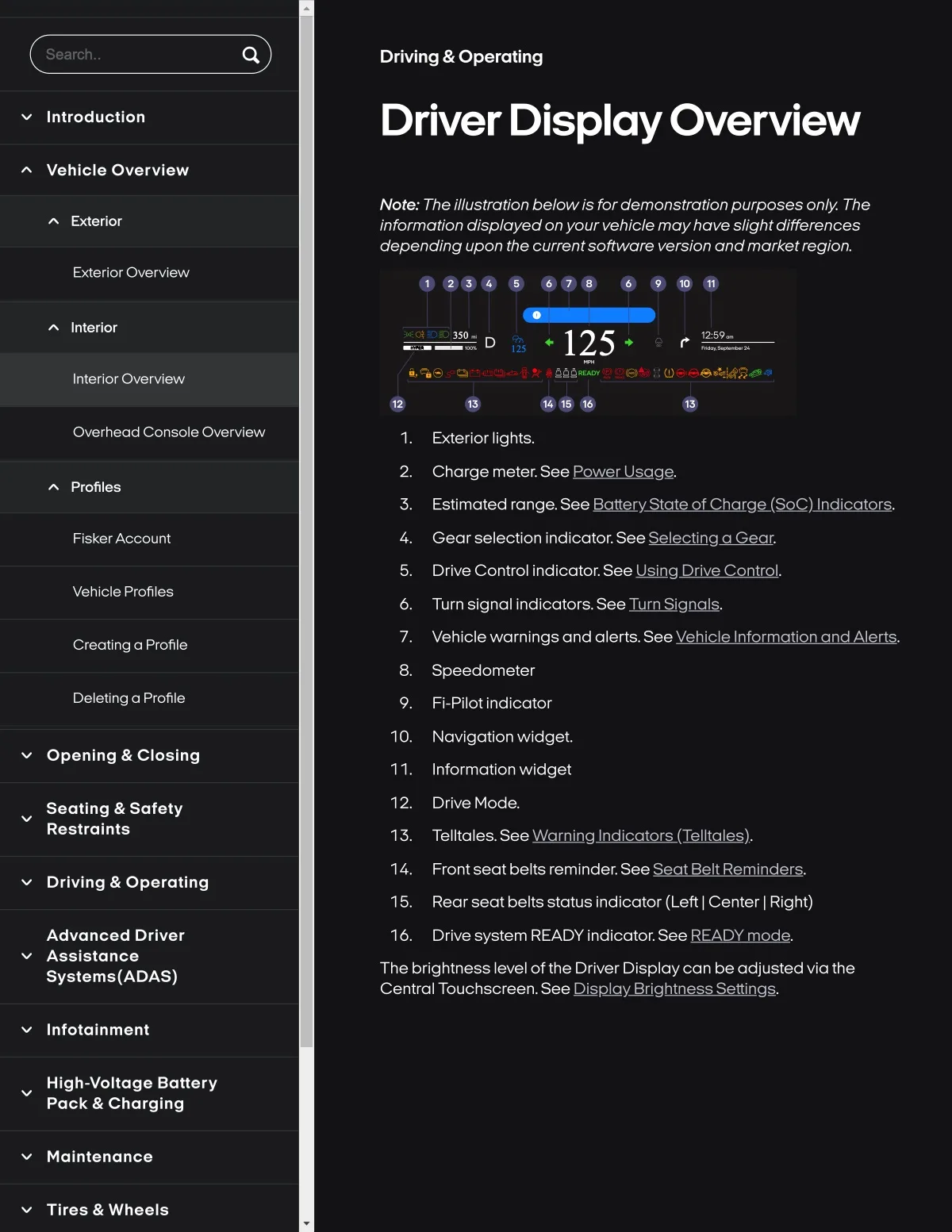
Note.. The illustration belowis for demonstration purposes only. The
information displayed on your vehicle moyhave slight differences
depending upon the currentsoftware version andmarketregion.
Exterlor
Exterior Overview
••••• ••••
Inlerfor
350.
125.
12'.59_
125
Interlor Overvlew
Overhead Console Overvlew
Exterlor Ilghts.
Charge meter. See Pow2Lg0.
Profiles
Estimated range. S8e RaLotyAatooLkngL(SoQ)JDdiGats.
Flsker Account
4. Gear selectlon Indlcator. See Solooi(DgoGoor.
S. Drlve Control Indicator. See U&lnglltl¥oQ.
Vehlcle Profiles
Turn signal Indlcators. S88 IuttLSigoaL&.
Cr8otSng a Profile
7. Vehlcle warnlngs and alerts. See
8. Speedometer
DeletSng a Profile
Fl-Pllot indlcator
10. Navlgatlon wldget,
Opanlng & Closlng
11. Informatlon wldget
Seatlng & Safaty
Reslralnts
12. Drive Mode.
Drlvlng & Operatlng
14. Front seat belts remlnder, See SooLB4.
15. Rear seat belts status indicator (Left | Center | Right)
Advanced Drlver
Asslstance
Syslems{ADAS)
16. Drive system READY indicator. See READY mode.
The brightness level of the Driver Displaycan be adjusted via the
Cantial Touchscreen.See Di
Infolalnment
High-voltage Battery
Pack & Charging
Maintenance
Tlres & Wheels